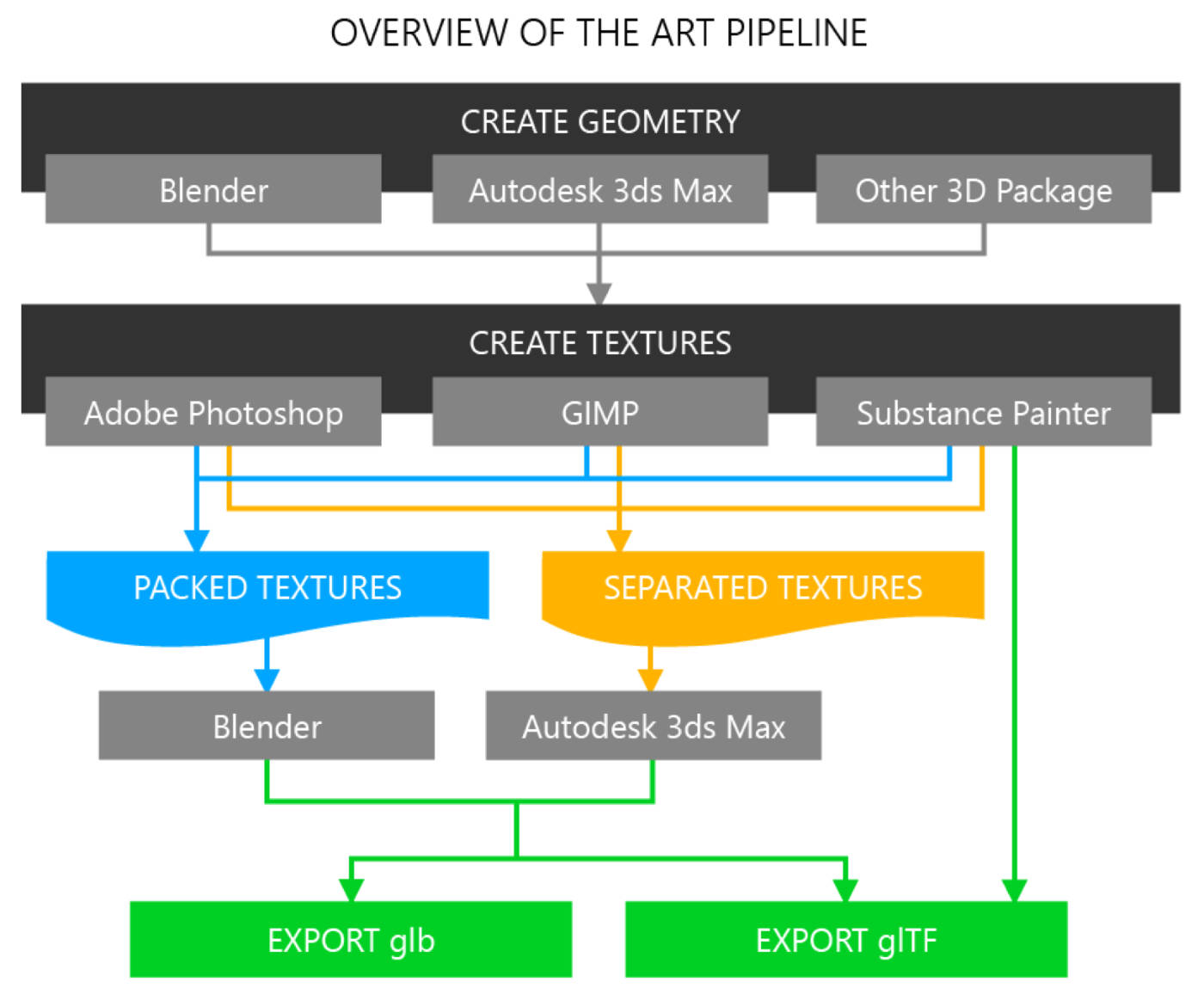
The framework gets all the attention. The asset pipeline is what determines whether the project actually ships.
I've seen Three.js projects that are well-architected, cleanly written, and run badly because nobody owned the asset pipeline. I've seen Unity projects with ugly code that ship at 4 megabytes and run sixty frames per second on a four-year-old phone because the asset pipeline was disciplined. The pipeline matters more than the framework. It's also where most teams have the least experience.
This article is the production-grade asset workflow I work through on serious browser-based 3D projects. It's the playbook for a technical artist or senior threejs developer building for the open web — where bandwidth is a tax, mobile is half the audience, and every megabyte you ship is a megabyte your users wait for.
The asset pipeline is the project
A 3D website development engagement that doesn't budget time for the asset pipeline is one that ships late, ships heavy, or ships ugly. Pick at most one.
For a project with twenty product variants, four material types, and basic camera interaction — the kind of thing a typical configurator development engagement covers — I'd budget 40-50% of total project time on the asset pipeline. The scene code, the UI, the integration with the host site: maybe 50% combined. The pipeline alone is the larger half.
This proportion surprises teams who haven't shipped a 3D web project before. It's also the reason so many in-house projects stall in week six: the team has the scene working, the UI implemented, the configurator logic complete — and then mobile performance falls apart, the textures look muddy at high zoom, the bundle is twelve megabytes, and the team realizes they need to redo the asset side from scratch.
A senior WebGL developer for hire would have started with the asset pipeline. The scene is the easy part once the assets are right.
The end-to-end pipeline
Here's the workflow I run, from raw model to production-ready browser asset.
1. Modeling discipline at the source
The pipeline starts before any export. The 3D modeler — whether in-house, agency, or freelance — needs guidelines that match the delivery target. Specifically:
- Polygon budget. A hero product asset for a web configurator is usually 20,000–50,000 triangles. A background prop is 1,000–5,000. A character that needs animation is 10,000–25,000. Numbers above that are dev budget at best, never a delivery target.
- Topology. Quads where possible (animation-friendly), triangulated cleanly at export. Avoid n-gons in unrelated places.
- UV unwrapping. UV islands packed tightly, no overlapping, with margins between islands to prevent texture bleeding. This is where amateur work shows up most clearly.
- Material count. A single asset should rarely use more than three or four materials. Atlasing materials and texture packing reduce draw calls dramatically.
The single biggest delivery cost on a browser 3D project is rework — a model that's "almost right" needs a pass for topology, a pass for UVs, a pass for materials, and a pass for export. Each pass is a calendar day. Setting expectations at the modeling stage saves all of them.
For training simulator development or educational game developer projects with dozens of assets, having a written asset spec — polygon counts, naming conventions, file structure — paid back ten times over the course of a project.
2. Material setup with PBR discipline
PBR — physically-based rendering — is the standard for both Three.js and Babylon.js. The materials use a metalness/roughness workflow with a specific set of texture maps:
- Base color (albedo) — the diffuse color, no lighting baked in
- Metallic + roughness — packed into a single map (usually metallic in B, roughness in G) to save a draw call
- Normal — surface detail, in tangent space
- Ambient occlusion — usually packed with metal/rough into a single ORM map (occlusion-roughness-metallic)
- Emissive — for self-illuminated surfaces, separate from base color
For most product configurator development, three textures per material is the budget: base color, normal, and packed ORM. Anything more is overhead unless the project specifically needs it.
3. Texture sizing for browser delivery
The single highest-leverage decision in the asset pipeline. Most projects get this wrong by oversizing.
For a typical web configurator viewed at desktop sizes:
- Hero product textures: 2048×2048, with a 1024 fallback for mobile
- Secondary product textures: 1024×1024
- Background props: 512×512 or smaller
- UI overlays: as small as the design allows, usually under 256×256
A 4096×4096 texture is rarely justified for browser delivery. The visual quality difference at typical viewing distances is barely perceptible, but the bundle size impact is enormous — a 4K base color in PNG can be eight megabytes by itself.
4. Compression — KTX2 / Basis Universal
This is where the asset pipeline goes from "OK" to "production-grade."
KTX2 with Basis Universal compression delivers GPU-ready textures that are 60–80% smaller than equivalent PNG, with quality differences invisible to most viewers. For any serious browser 3D project, every texture should be KTX2. Three.js, Babylon.js, and Unity all support KTX2 transcoding at runtime.
The pipeline:
- Export from Blender (or 3D source) as PNG or JPG at production resolution
- Run through
basisuortoktxto produce a KTX2 file with UASTC or ETC1S encoding - Reference the KTX2 file in the GLB; loader transcodes to the GPU's native format at runtime
Setting up the KTX2 pipeline takes a senior technical artist about half a day on the first project. It pays back over the lifetime of every project the team ships.
5. Geometry compression — Draco
Draco is a Google-developed mesh compression library that ships native support in Three.js, Babylon.js, and the GLTF spec. It typically shrinks geometry data by 70–90% with negligible runtime decoding cost.
For a configurator with several detailed product meshes, Draco compression on the geometry alone can cut the GLB file size by half. Combined with KTX2 textures, a model that was 18 megabytes uncompressed often ships at 2.5 megabytes — well within mobile-friendly delivery.
The trade-off: Draco-compressed assets need a decoder shipped with the page (~150 KB). For a single small asset, that overhead isn't worth it. For a project with multiple assets, it pays back immediately.
6. LOD strategy
Level-of-detail (LOD) means shipping multiple geometry resolutions of the same asset and swapping based on view distance or device tier.
For browser 3D, the practical LOD strategies are:
- Device-tier LOD — a "mobile" version with reduced polygon count, served when the client is on a phone. Implemented by detecting device capability and selecting a different GLB at load time.
- Distance-based LOD — the same asset at three resolutions, swapped based on camera distance. Three.js's LOD object handles this. Useful for scenes with many props at varying distances.
- Material-tier LOD — same geometry, simpler shaders for distant or mobile rendering.
Not every project needs LOD. A single-product configurator with the camera always close to the model usually doesn't. A 3D world for an educational game with dozens of objects at varying distances absolutely does.
7. Export and validation
Final step: export the GLB and validate it.
The validation checklist:
- gltf-validator — free CLI tool, catches structural problems with the GLB
- gltf-transform — node-based pipeline tool that can additionally apply Draco, KTX2, and geometry simplification
- gltf-pipeline — Cesium's tool, similar role
- Three.js GLTFLoader test — load the GLB in a minimal Three.js scene and verify it renders correctly
- Babylon.js Sandbox test — same check, different runtime, catches runtime-specific issues
A GLB that loads in one runtime can fail in another. Validation against the runtime you'll actually ship with is non-negotiable.
8. The tooling stack
For reference, the production tools I default to for browser 3D asset pipelines:
- Blender — primary modeling and texturing
- Substance Painter — for production-grade material authoring on hero assets
- gltf-transform — pipeline orchestration, applying Draco + KTX2 + simplification in a single command
- Basis Universal CLI (basisu, toktx) — KTX2 encoding
- Draco encoder — geometry compression
- gltf-validator — final structural check
Most of these are free and open source. The pipeline can be assembled by any team that's willing to invest a few days in setup. The reason teams pay for outside expertise here is usually that "a few days of setup" actually means two weeks of false starts when the team hasn't done it before.
What this means for hiring
A 3D website development project where the asset pipeline is figured out as you go is a project that ships heavy, late, or both. A project where the pipeline is set up in week one ships predictably.
This is one of the highest-leverage places to hire an independent specialist. The asset pipeline is a one-time setup with multiplicative payoff: every asset shipped through a clean pipeline is faster, smaller, and higher-quality than the equivalent through an ad-hoc one. The cost of getting the pipeline right is paid once; the cost of getting it wrong is paid every week of the project.
For an in-house team that's never shipped browser 3D before, hiring a senior threejs developer or technical artist for hire to set up the pipeline — even just for the first project — is one of the best returns on contractor spend in this category. The team learns the patterns, the pipeline becomes a permanent capability, and future projects start at week three instead of week zero.
If you have a browser 3D project that's stuck on asset performance, or a project starting where the pipeline hasn't been figured out yet, that's the conversation worth having early. The pipeline is the work. Setting it up right is what separates a project that ships from one that doesn't.