Short answer: VR surgical simulators are expensive per-seat investments that require dedicated physical space, and they sit idle roughly 90% of the time because trainees can't access them between scheduled sessions. A browser-based simulator — WebGL, no plugin, any laptop — trades some photorealism for ubiquitous access. For most training objectives, access drives proficiency more than photorealism does, and teaching programs that deploy browser modules alongside their VR programs have reported dramatically higher practice-hour logs per trainee.
The teams bringing me in to build browser-based medical training tools aren't trying to replace their VR investments. They're trying to fill the 90% of time the VR room is locked.
The access problem VR created in MedTech
When a medical program invests in VR surgical simulation — Osso VR, FundamentalVR, Precision OS, or a custom platform from a vendor like CAE Healthcare — they solve for high-fidelity skill practice. What they don't solve for is the other 20 hours per week a trainee might want to review a procedure, walk through anatomy with a decision-tree scenario, or rehearse before a scheduled VR session.
The constraints are structural:
- Hardware cost. Per-seat pricing means one headset per program, maybe two. The actual per-hour cost of use is high.
- Physical space. A VR simulator needs a dedicated room. Not every teaching hospital has one available during a resident's 2am shift.
- Scheduling. VR sessions are often reserved, supervised, and time-limited. A trainee can't decide at 11pm to practice one more time.
- Assessment fragmentation. VR platforms track their own metrics. Getting that data into a program-wide LCME-compliant record for accreditation is a perpetual integration project.
The AAMC's reports on simulation-based medical education have consistently emphasized that total time-on-task is the dominant predictor of skill acquisition in procedural training. VR wins on fidelity per session. It loses on sessions per week.
What the browser actually delivers
I should be honest about what a browser-based simulator can and can't do in 2026.
What it can't do well:
- Haptic feedback. WebGL runs in a browser, and the browser has no way to reach haptic devices for medical-grade needle-driving or suturing practice. If the training goal is manual dexterity, VR or physical simulators still win.
- True stereoscopic depth perception. Monoscopic 3D on a flat screen is different from binocular depth. For training where depth estimation is the core skill (like some endoscopic procedures), this matters.
- Immersion-dependent training. Crisis-response team coordination, operating-room sterile-field awareness — these benefit from VR's immersion in ways a browser can't replicate.
What it can do well:
- Procedural walkthroughs and step-by-step rehearsal. A browser can render the anatomy, animate the tool movement, and quiz the trainee on sequence and landmarks — which is most of what early procedural learning actually is.
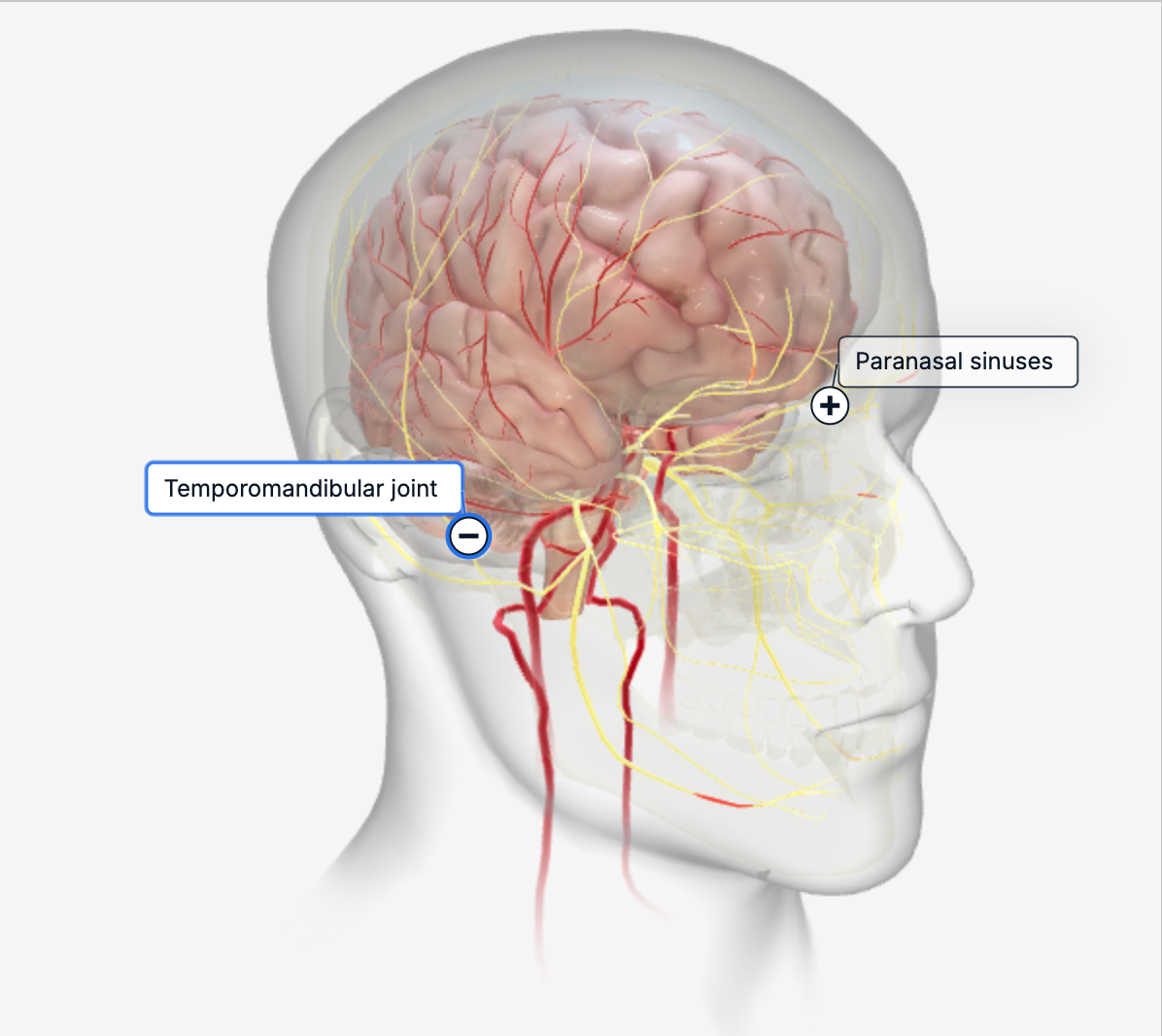
- Anatomical knowledge and spatial reasoning. Interactive 3D anatomy in the browser has been a solved problem since BioDigital Human and Complete Anatomy shipped their web viewers. The modern pipeline does it faster and cheaper.
- Decision-tree simulations. Case-based reasoning — "the patient presents with X, what's your next move?" — runs perfectly well in a browser with a 3D anatomical context.
- Basic manual skills with mouse or touchscreen proxies. This isn't going to replace dexterity practice on a physical simulator, but it gives an enormous amount of "muscle memory for sequence" that's otherwise only available in the OR itself.
Internal program data from the teaching hospitals that have layered browser modules on top of their VR investment consistently shows 3–4× the practice-hour log per trainee. That's the number that sells this to program directors.
The technical stack I default to
For teams that hire me to build browser-based medical training, the stack decisions cluster around a small set of reliable choices.
Three.js as the rendering engine, not React Three Fiber. I've written in detail about why R3F is often the wrong abstraction for performance-sensitive work — the short version is that R3F's reconciliation overhead costs frames during interaction, and medical simulators can't afford jitter during a timed procedure. Raw Three.js with a straightforward scene graph runs leaner and is easier to reason about when a performance issue surfaces three months in.
Cannon-es or Rapier for physics when needed. Most procedural simulators need basic collision detection and constraint physics — two-handed tool control, tissue deformation at a low level. I use Cannon-es for simpler cases and Rapier when the simulation gets physics-heavy. Both are production-ready.
WebXR as optional augmentation. If a program has Meta Quest headsets available, WebXR lets the same browser-based simulator run in immersive VR on those headsets with no separate build. This is a valuable "for free" upgrade path, but it's not the primary deployment target.
DICOM-to-web pipeline for patient-specific anatomy. When a training scenario is built from real imaging data (MRI, CT), the asset pipeline runs through tools like 3D Slicer and the Insight Toolkit (ITK) for segmentation, then decimates the mesh for web delivery. Getting this pipeline repeatable is half the engineering work on a project with more than one procedure.
LMS integration on the output side. Most programs need training activity and assessment data flowing into their existing learning management system. The two standards that matter are SCORM 1.2 and xAPI. Of those, xAPI is cleaner for the kind of fine-grained event tracking a simulator generates. I wire this up as part of the build; it's never the exciting part but it's often what convinces the institution to actually adopt the tool.
HIPAA posture. Training simulators that don't process real patient data have a dramatically simpler regulatory footprint than diagnostic tools. I build training. For diagnostic applications, I refer to specialists with FDA SaMD experience — that's a different engagement, not mine.
Rendering quality is mostly about baked lighting
The single biggest driver of perceived visual quality in a browser-based medical simulator isn't geometric detail — it's the lighting. Real-time global illumination in a browser is still a performance tax most simulators can't afford. But a well-baked lightmap, paired with a good image-based lighting environment, makes the difference between "this looks like a game demo" and "this looks like teaching material."
Blender's Cycles baking is my default for lightmap generation. A few hours of bake time produces lighting that matches expensive offline-rendered reference within an acceptable margin, and the runtime cost in the browser is zero — it's just another texture. For dynamic elements (tools, instruments, moving anatomy), I supplement with runtime dynamic lighting that respects the baked environment.
Color accuracy matters more in medical training than in most other 3D applications. Teams usually want tissue colors that calibrate against photographic reference — this is a specific pipeline choice (linear-space rendering, ACES or Filmic tone mapping, attention to the color grading after tone mapping). It's not difficult to get right, but it's a detail many generic 3D developers don't think about.
What a project looks like
For MedTech teams that bring me in, engagements typically run 8–14 weeks — longer than a typical e-commerce build, because the review cycles are more deliberate and the asset quality bar is higher.
Weeks 1–3. Asset pipeline and first procedural walkthrough. The subject-matter expert (usually a practicing clinician or a medical illustrator) works with me to nail down the anatomical accuracy standard, the asset naming conventions, and the first scene. This phase is where most project risk lives. If the pipeline isn't right, every subsequent scene is 3× slower.
Weeks 4–7. Core simulator loop: tool interaction, step sequencing, feedback on trainee actions. At this point the team has something they can walk a training resident through, and we start getting real usability feedback. Most changes in this phase are from SMEs catching small anatomical inaccuracies that look wrong to a clinician's eye.
Weeks 8–10. Assessment instrumentation and LMS integration. Events get wired up to xAPI, program-specific assessment rubrics get implemented, and the data starts flowing into the institution's existing record system.
Weeks 11–14. Accessibility, browser compatibility testing, load testing on the institution's actual infrastructure, documentation. Many institutions deploy on older browsers (IE-era Edge is rare now, but Safari lags on WebGL extensions), and this phase is the hardening pass that makes the tool reliable in a real training environment.
For programs with tighter budgets, a single-procedure training module compresses to 6–8 weeks. A full curriculum — 8–12 procedures, integrated assessment — is a 6-to-9-month engagement with multiple artists and subject-matter experts beyond me.
When this doesn't make sense
I turn down or redirect medical training projects when:
- The training goal is high-fidelity manual dexterity. A web simulator can't meaningfully substitute for a physical surgical trainer or VR for suturing, needle driving, or fine instrument control. I'll say so directly.
- The target is diagnostic software, not training. FDA clearance is a completely different engagement — different team, different timeline, different risk posture. I build training tools. Diagnostic work goes to specialists with SaMD experience.
- The institution doesn't have clinical SME time to commit. A medically inaccurate training simulator is worse than no simulator. Without a real clinician reviewing every scene, I won't ship.
How to start
If you're evaluating browser-based training for your program or MedTech product line, the first question is almost never "which developer?" It's whether your curriculum has the clinical SME bandwidth and asset quality standards to support the build. I'm happy to spend 30 minutes reviewing your program needs, existing 3D assets (if any), and deployment context to give you a straight answer on scope, budget, and realistic timeline.
I join MedTech and teaching-program teams for 8–14 week engagements to build browser-based training and anatomy tools. Not a MedTech platform, not a diagnostic tool — just the WebGL developer your team needs for the interactive 3D portion of whatever you're building.
Book a 30-minute consultation or see other demos I've shipped.
See it in practice
Related reading: - The case against React Three Fiber for marketing sites - Why your Three.js scene is slow on mobile - Gamified learning modules that actually retain